openFrameworks is an open source C++ programming framework for creative coding. The framework is developed collaboratively by members of the creative coding community. The framework runs on a variety of platforms including Linux, Windows, and MacOS.
Core Functionality and Addons
openFrameworks provides the typical functionality for creating software applications. This includes the creation of application windows, graphical user interfaces, event handling, file loading and writing, and network communication. The focus of openFrameworks on creative coding shows itself in the form of a wide diversity of classes that support the creation and manipulation of media such as images, videos, 3d graphics, and sound.
openFrameworks distinguished between functionality that forms part of the core framework and those that goes beyond this. The latter is handled by addons. While the core functionality is developed and maintained by a relatively small team of developers, addons can be provided by anybody. The number of addons is constantly growing. Unfortunately, it is not uncommon for many addons to become obsolete when the core part of openFramework is updated.
Integration with IDEs
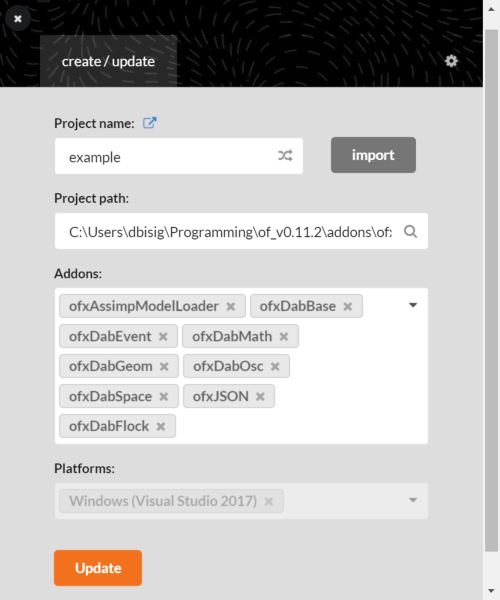
openFrameworks doesn’t provide its own integrated development environment (IDE). Instead, if provides a tool named “projectGenerator” that simplifies the creation of projects that can be imported into existing IDEs such as XCode, VisualStudio, or QTCreator.
Coding Concepts
openFrameworks tries to lower the entry barrier for creative coders who don’t possess expert knowledge in C++. Furthermore, openFrameworks attempts to make the transition from other creative coding environments, in particular Processing, easy by using a similar coding style and program structure. This involves for instance providing similar function names and entry points into the main application. Other simplifications involve hiding or avoiding some of the more advanced C++ programming principles such as templates and exceptions. Also, openFrameworks places its own source code and all its dependencies in the same directory which is then accessed in the IDE project through local paths. Furthermore, openFrameworks avoids precompiled and dynamically linked libraries when working with addons. Finally, openFrameworks provides an ample example source code to illustrate the usage of its core functionality. These examples are meant to be easier to learn from than through a standard API documentation. From my point of view, this lack of a comprehensive API documentation can become a significant drawback especially for more experienced coders.
Default Code Structure
When using the projectGenerator to create a new project from scratch, three source files are automatically generated: main.cpp, ofApp.h, and ofApp.cpp.
main.cpp
#include "ofMain.h"
#include "ofApp.h"

//========================================================================
int main( ){
	ofSetupOpenGL(1024,768,OF_WINDOW);			// <-------- setup the GL context

	// this kicks off the running of my app
	// can be OF_WINDOW or OF_FULLSCREEN
	// pass in width and height too:
	ofRunApp(new ofApp());

}
This file usually contains only minimal code and serves to setup an OpenGL context and then run a new instance of the ofApp class. Concerning graphics contexts: graphic libraries other than OpenGL such as Vulcan, DirectX or Metal are currently not directly supported.
ofApp.h
This header file declares the member variables and functions of the ofApp class. After creating an empty project, the declaration contains only member functions and no member variables. All member functions are public.
The member functions are:
- void setup();
- void update();
- void draw();
The function setup() is called when ofApp is instantiated. This happens when the corresponding application is started.
The function update() is called repeatedly and is typically used to conduct computations that are not directly involved in creating a visual output.
The function draw() is also called repeatedly and is typically used to render a visual output. Both the update() and draw() functions run in the same thread and can not be called asynchronously.
The other member functions are all callback functions that handle events such as key presses, mouse movement, and window resize.
#pragma once

#include "ofMain.h"

class ofApp : public ofBaseApp{

	public:
		void setup();
		void update();
		void draw();

		void keyPressed(int key);
		void keyReleased(int key);
		void mouseMoved(int x, int y );
		void mouseDragged(int x, int y, int button);
		void mousePressed(int x, int y, int button);
		void mouseReleased(int x, int y, int button);
		void mouseEntered(int x, int y);
		void mouseExited(int x, int y);
		void windowResized(int w, int h);
		void dragEvent(ofDragInfo dragInfo);
		void gotMessage(ofMessage msg);

};
ofApp.cpp
This source file contains the definitions of the functions (and member variables) that have been declared in ofApp.h. After creating an empty project, all definitions have empty function bodies.
#include "ofApp.h"

//--------------------------------------------------------------
void ofApp::setup(){

}

//--------------------------------------------------------------
void ofApp::update(){

}

//--------------------------------------------------------------
void ofApp::draw(){

}

//--------------------------------------------------------------
void ofApp::keyPressed(int key){

}

//--------------------------------------------------------------
void ofApp::keyReleased(int key){

}

//--------------------------------------------------------------
void ofApp::mouseMoved(int x, int y ){

}

//--------------------------------------------------------------
void ofApp::mouseDragged(int x, int y, int button){

}

//--------------------------------------------------------------
void ofApp::mousePressed(int x, int y, int button){

}

//--------------------------------------------------------------
void ofApp::mouseReleased(int x, int y, int button){

}

//--------------------------------------------------------------
void ofApp::mouseEntered(int x, int y){

}

//--------------------------------------------------------------
void ofApp::mouseExited(int x, int y){

}

//--------------------------------------------------------------
void ofApp::windowResized(int w, int h){

}

//--------------------------------------------------------------
void ofApp::gotMessage(ofMessage msg){

}

//--------------------------------------------------------------
void ofApp::dragEvent(ofDragInfo dragInfo){

}
Programmable Renderer
Openframeworks provides default GLSL shaders for rendering 3D graphics using OpenGL. When writing shaders on your own, it is useful to know how these shaders interface with the graphics classes in openFrameworks.
First of all, it is recommended to specify the exact OpenGL and GLSL versions. The OpenGL version can be specified in the main.cpp in the function call that creates the OpenGL context.
ofGLWindowSettings settings;
settings.setGLVersion(4, 2); // specifies OpenGL Version 4.2
settings.setSize(1024, 768); // specifies size of application window
ofCreateWindow(settings);
The GLSL Version can be specified at the beginning of the source code for the shaders. This applies to all shaders (vertex, fragment, geometry).
#version 410 // specifies GLSL Version 4.103D graphics data such as vertex positions, vertex colours, vertex normals, and vertex texture coordinates are associated by OpenFrameworks with specific memory locations on the GPU. These locations need to be specified at the beginning of the vertex shader. The names of the variables used for to refer to memory locations can of course be arbitrary.
layout(location = 0) in vec4 vertexPosition_ModelSpace;
layout(location = 1) in vec4 vertexColors;
layout(location = 2) in vec3 vertexNormal_ModelSpace;
layout(location = 3) in vec2 vertexTextureCoordinates;
Examples of such shaders are provided as part of the addons that have been developed during the E2-Create project.