If you wish to reuse an image or diagram, reference it. If you do not know the original source to cite, you can use image reverse search engines such as Tineye.
The site will be able to upload the image or insert a URL. The filters will enable you to find the other places where the image has been used; following the links, you will see either the source or information about it.
The author takes no responsibility for the content of this page, which is not intended as binding legal advice. The views are about copyright in the UK Higher Education sector context.
The author takes no responsibility for the content of this page, which is not intended as binding legal advice. The views are about copyright in the UK Higher Education sector context.
The following chart from the Creative Commons is a guide to ensure that adaptations comply with the licences’ terms.
The left-hand column identifies the licence of the original work to use in the adaptation.
By looking across the table, it shows the available licences for the new creation.
CC does not recommend using a licence if the corresponding box is yellow, although doing so is technically permitted by the licence terms. The grey boxes indicate those licences that one may not use as an adapter’s licence.
Examples:
If one adapts a BY-NC work, the BY-NC will do for the adaptation.
If one adapts a BY work, either BY or BY-NC will do for the adaptation.
Work licensed with BY-SA or BY-NC-SA must have the same licence applied for the adaptation.
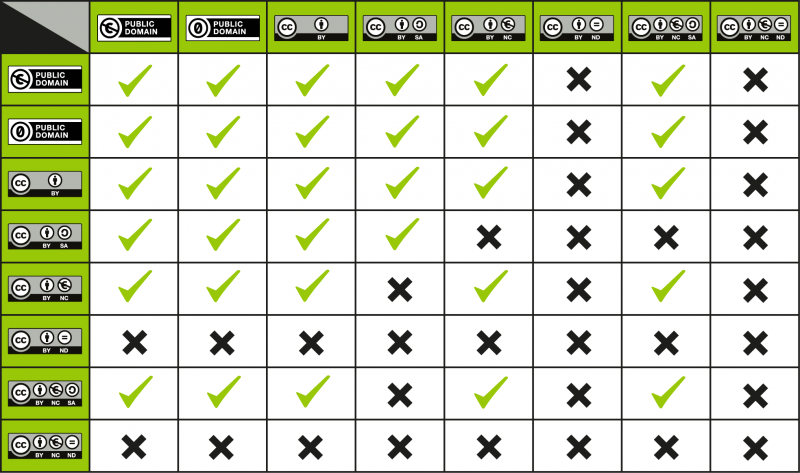
Another type of licence compatibility relates to licences when remixing more than one pre-existing work.
Find on the left column a licence of the works and match it with the one on the top to discover a licence that may apply to a second work:
A ‘tick’ at the intersection means that works under those two licences can be remixed.
An ‘X’ usually means the works may not be remixed.
When deciding on a licence to use for the adaptation, it is better to choose the more restrictive of the two licences on the works that are getting combined, to ease reuse for downstream users.
The author takes no responsibility for the content of this page, which is not intended as binding legal advice. The views are about copyright in the UK Higher Education sector context.
Wikimedia and Wikipedia’s material minimum standard licence is the Creative Commons By Attribution ShareAlike.
You will be able to find material labelled with the Creative Commons By Attribution and the public domain.
Please note that Wikimedia and Wikipedia’s material are distributed under the US copyright law. Use care in selecting items licensed in the public domain are not necessarily so in the UK or other countries. It is advisable to follow the link to the original source and seek released and licence information from it rather than rely on what is displayed on Wikipedia/Wikimedia.
Assuming that the work is correctly licensed from Wikimedia, you may click on the world icon to discover the following:
The author takes no responsibility for the content of this page, which is not intended as binding legal advice. The views are about copyright in the UK Higher Education sector context.
The Glasgow Caledonian University UK Copyright Advisor is a tool that gives online information (but not legal advice) on copyright considerations on audio files, book chapters, computer codes, images, journal articles, maps and video files.
The author takes no responsibility for the content of this page, which is not intended as binding legal advice. The views are about copyright in the UK Higher Education sector context.
TED Talks impose a fee to upload videos on a Subscription-Based Educational Service (Online Education Company) such as FutureLearn.
TED talks are distributed under the Creative Commons By Attribution NonCommercial-NonDerivatives. Therefore, they cannot be used for commercial purposes. No edits are allowed. A good practice is to suggest students search for a specific video directly on the website.
It is OK to include links to TED Talks to Aula.
There are several TED Talks; for example, TEDx talks are only available on YouTube. See Can I link to YouTube?
The author takes no responsibility for the content of this page, which is not intended as binding legal advice. The views are about copyright in the UK Higher Education sector context.
Including downloaded and scanned materials such as book chapters and journal articles is most likely subject to copyright restrictions. The university has the CLA Licence that covers most UK publications and some US and other international publishers. The CLA Licence allows for copying and distributing limited amounts of material without requesting permission every time. Contact your Subject Librarian for more information on whether your re-use of material is covered under the licence.
The author takes no responsibility for the content of this page, which is not intended as binding legal advice. The views are about copyright in the UK Higher Education sector context.
Manage Cookie Consent
We use cookies to optimise our website and our service.
Functional
Always active
The technical storage or access is strictly necessary for the legitimate purpose of enabling the use of a specific service explicitly requested by the subscriber or user, or for the sole purpose of carrying out the transmission of a communication over an electronic communications network.
Preferences
The technical storage or access is necessary for the legitimate purpose of storing preferences that are not requested by the subscriber or user.
Statistics
The technical storage or access that is used exclusively for statistical purposes.The technical storage or access that is used exclusively for anonymous statistical purposes. Without a subpoena, voluntary compliance on the part of your Internet Service Provider, or additional records from a third party, information stored or retrieved for this purpose alone cannot usually be used to identify you.
Marketing
The technical storage or access is required to create user profiles to send advertising, or to track the user on a website or across several websites for similar marketing purposes.
This website was created using Coventry.Domains, a service of the Coventry University Group. The information, views, opinions and discussion contained on this website are those of the author(s) and do not necessarily reflect the views and opinions of the Coventry University Group. For more information on privacy, cookies, takedown requests and more, visit our policies page.