Tag: Tips and tools

Can I use software screenshots planned to be made freely/openly available online as part of a training resource?

This type of use falls under the exception in copyright law illustration for instruction.

It constitutes a low risk as long as it doesn’t compete with the product (for example, if the product owner were to sell separate videos on how to use the product, which usually is highly unlikely).

It’s no different from the many ‘How to’ videos you find on YouTube that don’t appear to be taken down.

Some software licences may even include permission to make copies/screenshots for user training purposes.

The author takes no responsibility for the content of this page, which is not intended as binding legal advice. The views are about copyright in the UK Higher Education sector context.
Notes on accessing newspaper articles online

Articles can generally be accessed on Locate when the library subscribes to the newspaper’s back issues.

Independent journalists write articles, but sometimes they aren’t available through subscriptions like the library’s. This may be due to the contract independent journalists have with that newspaper and the newspaper’s contract with that distribution platform.

Sometimes the newspaper makes the article available online for a while, but then has to take it down for contractual reasons.

It may be inconvenient, but that is how independent journalists earn a living and maintain their clout.

If the article is part of essential reading, you could try to seek permission from the journalist. Unfortunately, Coventry University doesn’t hold a Newspaper Licensing Agency (NLA) educational licence.

You may also try another avenue by asking a subject librarian if the article can be obtained through another licence, such as the CLA one.

Additionally, if a specific article previously openly available online is becoming fiddly to find, it is because it is in the process of being removed – search engines’ crawlers are still finding traces of it, but eventually, they will lose track – you might as well find an alternative resource to ensure longevity in the course (unless you obtain permission).

The author takes no responsibility for the content of this page, which is not intended as binding legal advice. The views are about copyright in the UK Higher Education sector context.
Can I include screenshots?

Can lesson content include screenshots from various websites used as a basis for teaching and activities?

Screenshots can be included (provided there is an acknowledgement) in the context of a module, where they are being used for instruction purposes, and they are unlikely to be a substantial part of the website as a whole.

In this context, it would be difficult to see how it could harm the company’s commercial interest.

Additionally, it would be permissible under fair dealing exceptions such as those for illustration for instruction or criticism and review.

The author takes no responsibility for the content of this page, which is not intended as binding legal advice. The views are about copyright in the UK Higher Education sector context.
How do I find a legal version of an e-publication?

Some authors often upload their published version on ReseachGate and academia.edu when transferring their copyright to the publisher.

ReseachGate and academia.edu are commercial platforms, and most publishers do not allow authors to upload articles on those platforms because the existence of a published PDF online will cause them to lose income. There have been instances of publishers suing universities and authors for copyright breaches.

We cannot provide hyperlinks to documents posted on those platforms because linking to illegally posted sources online is unlawful.

So, what are the options?

  1. Check if the library has the publication. If it is a journal article, then if we subscribe, you can provide the DOI to the article (starting with http://dx.doi.org/…). If it is a book, you may provide the permalink from Locate.
  2. Find the publication on an institutional repository: a) look at the afflation of the authors. If it is from the UK or Europe and it is a post-2014 publication, likely, a version is legally deposited in the affiliated institutional repository; b) search on the browser for the name of the affiliation (e.g. “Coventry University”) plus the word ‘repository’. It will give you the link to the institutional repository; c) search for the title or author, and you may find the record and PDF; d) share that link openly.

What about hyperlinks and copyright?

How do I link to e-published articles?

Why shouldn’t we link directly to PDFs?

How do I reference sources?

What about hyperlinks and copyright?

The author takes no responsibility for the content of this page, which is not intended as binding legal advice. The views are about copyright in the UK Higher Education sector context.

How do I reference sources?

Use the APA Referencing Style to reference correctly in line with Coventry University Group guidelines.

Some disciplines, like Law, will require other referencing styles.

Include official links to referenced resources, such as official articles, landing pages, or officially uploaded material. 

What about hyperlinks and copyright?

How do I link to e-published articles?

Why shouldn’t we link directly to PDFs?

How do I find a legal version of an e-publication?

Can I link to videos and films?

What about hyperlinks and copyright?

The author takes no responsibility for the content of this page, which is not intended as binding legal advice. The views are about copyright in the UK Higher Education sector context.

How do I acknowledge Free Art licensed material?

Free Art Licence grants the right to freely copy, distribute, and transform creative works without any changes. It needs to be acknowledged in the following way:

[author], “[title]”, [date of the work]. [where to find the originals]. Copyleft: This is a free work. You can copy, distribute, and modify it under the terms of the Free Art License http://artlibre.org/licence/lal/en/

The author takes no responsibility for the content of this page, which is not intended as binding legal advice. The views are about copyright in the UK Higher Education sector context.

How do I acknowledge Open Government licensed material?

Open Government licensed material is released by the British government and licences to the public under certain conditions.

You must acknowledge the source of the information, including or linking to any attribution statement specified by the Information Provider(s) and, where possible, provide a link to the licence http://www.nationalarchives.gov.uk/doc/open-government-licence/version/3/

If the Information Provider does not provide a specific attribution statement, you must use the following:

Contains public sector information licensed under the Open Government Licence v3.0

If you are using information from several information providers and listing multiple attributions is not practical for your product or application, you may include a URI or hyperlink to a resource that contains the required attribution statements.

The author takes no responsibility for the content of this page, which is not intended as binding legal advice. The views are about copyright in the UK Higher Education sector context.

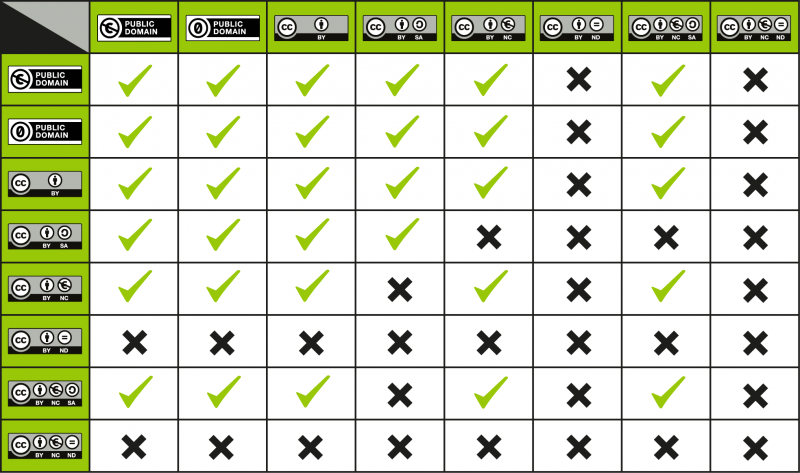
Creative Commons adapters and remixers licence chart

The following chart from the Creative Commons is a guide to ensure that adaptations comply with the licences’ terms.

The left-hand column identifies the licence of the original work to use in the adaptation.

By looking across the table, it shows the available licences for the new creation.

The table is titled "Adapter's licence chart" and details the compatibility of different licences for adapting works based on their original licence. It helps determine which licences are compatible for adapting works, ensuring proper usage and adherence to licensing terms. The table is organised with the "Status of original work" listed in the leftmost column and the "Adapter's licence" types listed across the top row. The intersections of these rows and columns are colour-coded to indicate compatibility: green cells represent permissible combinations, yellow cells represent permissible combinations with some restrictions, and grey cells represent combinations that are not allowed. Colour-coded details: for Public Domain as original work, all adapter licences are green; for  By Attribution as original work, it is green for BY, BY-NC, BY-NC-ND, BY-NC-SA, BY-SA, BY-ND and yellow for PD; for  By Attribution NonCommercial as original work, it is green for BY-NC, BY-NC-ND, BY-NC-SA and yellow for BY-NC, BY-ND, BY-SA, PD; for  By Attribution NonCommercial-NoDerivs as original work, it is grey for all adapter licences; for  By Attribution NonCommercial-ShareAlike as original work, it is green for BY-NC-SA only and grey for all other adapter licences; for By Attribution NoDerivs as original work, it is grey for all adapter licences; for By Attribution ShareAlike as original work, it is green for BY-SA only and grey is grey for all adapter licences.

CC does not recommend using a licence if the corresponding box is yellow, although doing so is technically permitted by the licence terms.
The grey boxes indicate those licences that one may not use as an adapter’s licence.

Examples:

  • If one adapts a BY-NC work, the BY-NC will do for the adaptation.
  • If one adapts a BY work, either BY or BY-NC will do for the adaptation.
  • Work licensed with BY-SA or BY-NC-SA must have the same licence applied for the adaptation.

Another type of licence compatibility relates to licences when remixing more than one pre-existing work.

The chart helps users understand which Creative Commons licenses can be used together when mixing or reusing content under different licensing terms. The leftmost column lists different types of Creative Commons licenses, and the top row lists the same licenses. The intersections of these rows and columns indicate whether a specific combination of licenses is compatible, where each cell in the grid either has a checkmark (signifying that the combination of licenses is compatible) or a black "X (indicating that the combination of licenses is incompatible). In particular, Public Domain and CC BY (Attribution) are compatible with all but those with a NoDerivs element; CC BY-SA (Attribution-ShareAlike) is compatible with all but those with NonCommercial and NoDerivs elements; CC BY-NC (Attribution-NonCommercial) and CC BY-NC-SA (Attribution-NonCommercial-ShareAlike) are compatible with all but CC BY-SA (Attribution-ShareAlike) and those with a NoDerivs element; CC BY-ND Attribution-NoDerivs and CC BY-NC-ND Attribution-NonCommercial-NoDerivs are incompatible with any.

Find on the left column a licence of the works and match it with the one on the top to discover a licence that may apply to a second work:

  • A ‘tick’ at the intersection means that works under those two licences can be remixed.
  • An ‘X’ usually means the works may not be remixed.

When deciding on a licence to use for the adaptation, it is better to choose the more restrictive of the two licences on the works that are getting combined, to ease reuse for downstream users.


Forward to How can I use works on Wikimedia and Wikipedia?

Back to Considerations on remixed/adapted and derivative works for Creative Commons licensed material

Back to Creative Commons licences

Back to Open licences

Back Home

The author takes no responsibility for the content of this page, which is not intended as binding legal advice. The views are about copyright in the UK Higher Education sector context.

How can I use works on Wikimedia and Wikipedia?

Wikimedia and Wikipedia’s material minimum standard licence is the Creative Commons By Attribution ShareAlike.

You will be able to find material labelled with the Creative Commons By Attribution and the public domain.

Please note that Wikimedia and Wikipedia’s material are distributed under the US copyright law. Use care in selecting items licensed in the public domain are not necessarily so in the UK or other countries. It is advisable to follow the link to the original source and seek released and licence information from it rather than rely on what is displayed on Wikipedia/Wikimedia.

Assuming that the work is correctly licensed from Wikimedia, you may click on the world icon to discover the following:

  • Page URL
  • File URL
  • Preferred attribution
  • Scripts to embed both attribution and file

Back to How do I pick a Creative Commons licence for my work?

Back to Creative Commons licences

Back to Open licences

Back Home

The author takes no responsibility for the content of this page, which is not intended as binding legal advice. The views are about copyright in the UK Higher Education sector context.

This website was created using Coventry.Domains, a service of the Coventry University Group. The information, views, opinions and discussion contained on this website are those of the author(s) and do not necessarily reflect the views and opinions of the Coventry University Group. For more information on privacy, cookies, takedown requests and more, visit our policies page.